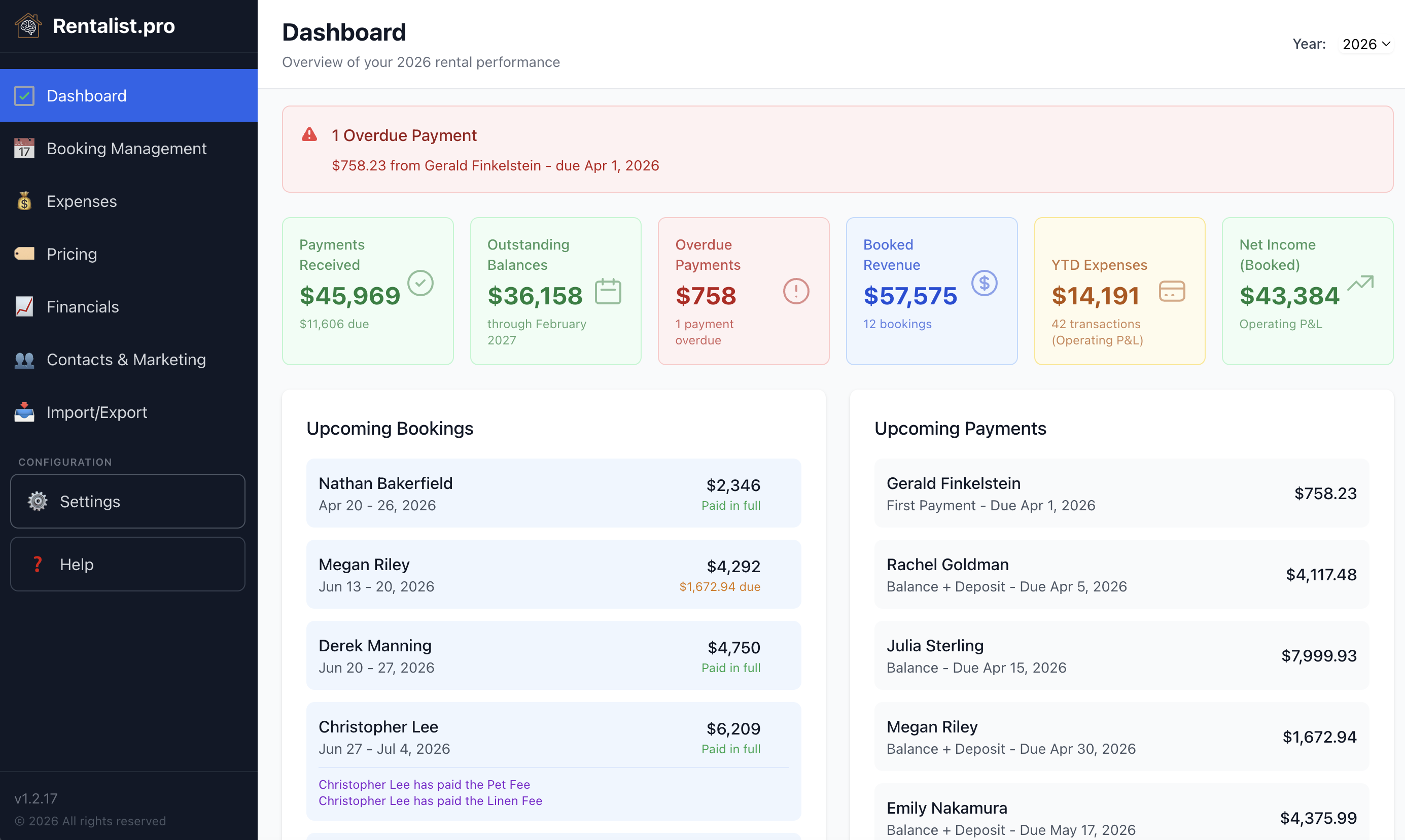
The Dashboard answers one question: how is the rental doing right now? Six boxes run across the top:
- Received — What has arrived on this year's stays, occupancy tax and deposits included
- Due — What is still owed on this year's and next year's stays
- Overdue Payments — Payments whose date has passed and that haven't been marked received
- Booked Revenue — Rent and fees on this year's stays, with no tax and no deposit you give back
- YTD Expenses — What you have spent this year
- Net Income (Booked) — Booked Revenue minus YTD Expenses
Below them are your upcoming bookings, the payments due, and any reminders — occupancy tax deadlines among them, if you collect it. Overdue payments show in red. Tax deadlines approaching get flagged. The goal is a quick check-in that shows whether something needs attention today. If you have more than one property, the Dashboard covers all of them, and each alert names the property it's about.
Beyond overdue payments and tax deadlines, the Dashboard raises a few nudges — each about something that quietly costs money if it slips:
- An open week that's running late. Flagged when it's closer to arrival than that week normally books, judged against your own history rather than a generic rule. Weeks that always go last-minute stay quiet. Snooze it for a week, or turn it off for that property.
- A season that isn't priced out yet, since everything else is built on those rates. Snooze it for a week, or turn it off for that property.
- A tax difference waiting on your decision after a rate change — collect it or absorb it. This one stays until you've answered Collect or Absorb for each stay.
Each one only appears when there's something to say, and none of them blocks anything.
Three of the boxes — Booked Revenue, YTD Expenses, and Net Income (Booked) — are year-to-date summaries that update as you add bookings and expenses. They provide a rolling view of your financial performance for the current year.
These are operating figures. The Dashboard always shows YTD Expenses and Net Income as operating figures. The Operating P&L / Cash Flow toggle in Budget & Analytics > Overview changes the Analytics screens and does not change the Dashboard.
This is your rental income before expenses — what guests pay you for the stay itself. Includes:
- Rent from all non-cancelled bookings
- All enabled fees (cleaning, pet, linen, EV charger, and any custom fees you've configured)
- Retained amounts from cancelled bookings
- Security deposits you kept, and damage or incident payments recorded from a payout
- Owner Occupied stays — any rent and fees you recorded on them count here
Does not include:
- Occupancy tax — that's money you collect on behalf of the state, tracked separately in Budget & Analytics > Occupancy Tax Payments
- A commission a platform kept from your payout, where Rentalist knows it — that money never reached you
- Security deposits you give back — those are held for the guest and returned, not income
What counts as income on your return depends on your own situation. Rentalist isn't the authority on that — verify with your accountant.
It only counts expenses dated today or earlier — one dated later in the year doesn't show up here until its date arrives.
- Includes operating expenses like cleaning, insurance, repairs, utilities, mortgage interest, and similar day-to-day costs of running the property
- Excludes mortgage principal — that's not an expense, it's building equity in your property
- Excludes capital improvements — a new roof or renovation is an asset purchase that gets depreciated over time, not a running cost
- Excludes auto/travel/mileage — this is a personal tax deduction for trips to the property, not a property operating cost
Occupancy tax payments are not included — those are pass-through collections you send on to your tax office, not business expenses. They are tracked in Budget & Analytics > Occupancy Tax Payments.
Which of these costs is deductible, and how, depends on your own situation. Rentalist isn't the authority on that — verify with your accountant.
Calculated as: Booked Revenue minus YTD Expenses.
- This represents how the rental business is performing, leaving out loan principal and capital improvements
- This is a rolling snapshot — it reflects what has been booked and spent so far
- It is not a forecast or projection — it only includes actual bookings and recorded expenses
- The number is not final until year end, when all bookings are complete and all expenses are logged
The two sides don't cover quite the same stretch of time: Booked Revenue counts a stay dated later in the year the moment it's booked, while YTD Expenses only counts a bill dated today or earlier. So earlier in the year, this figure can look better than the year will end up looking.
Due answers one question: how many dollars are you still waiting on. For each stay, it's what the stay should bring in — rent, fees, occupancy tax, and any security deposit you haven't collected yet — less what's been received. Cancelled stays are left out. The subtitle counts how many bookings have a balance, or says "Nothing outstanding" when none do.
These numbers update automatically as you add bookings and log expenses. For detailed breakdowns, tax-organized views, and multi-year comparisons, go to Budget & Analytics.