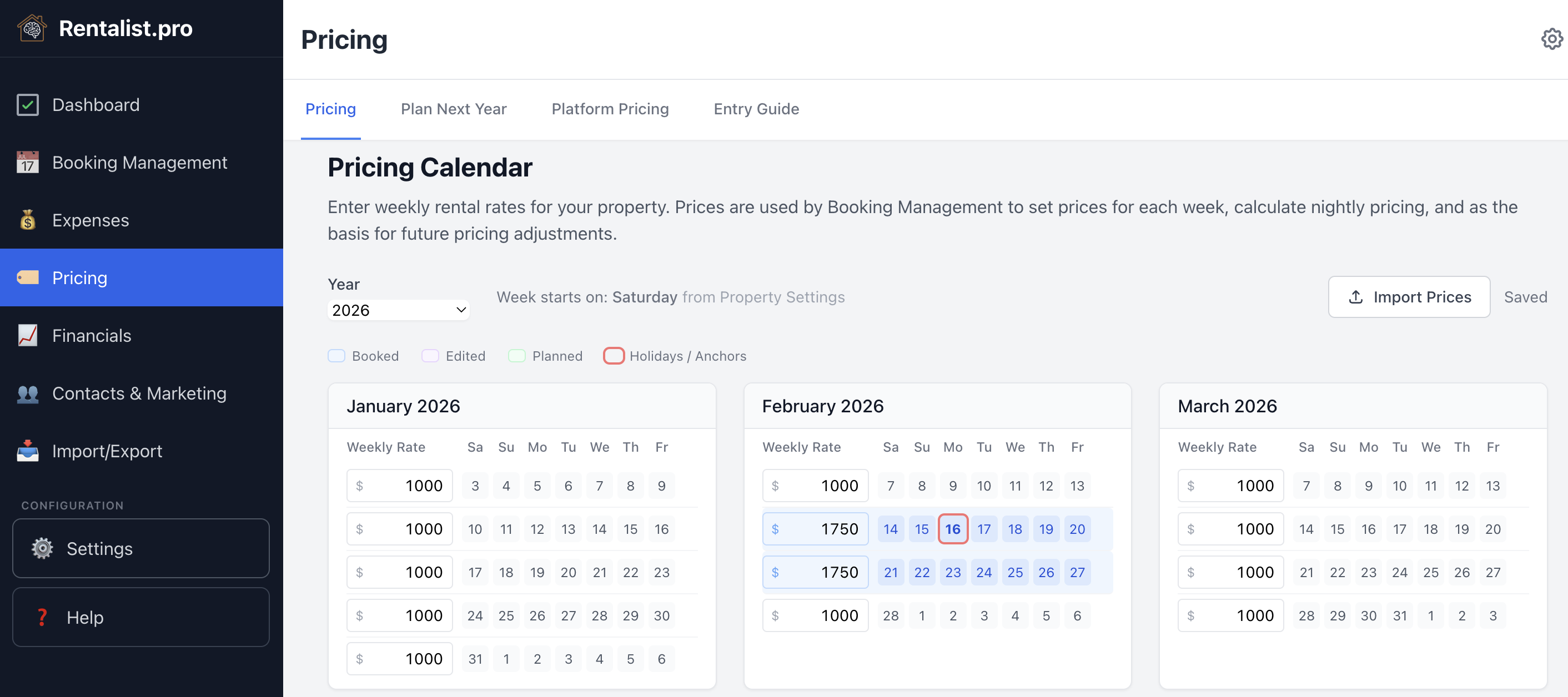
The calendar on the Pricing tab is your single source of truth for weekly rates. Rates entered here flow to Platform Pricing and Entry Guide automatically.
- Enter rates week by week — Click on any week to type in your rate. Use the year selector at the top to switch between years.
- Booked weeks — Weeks with a confirmed booking are shaded and show the guest's name on hover. The price box is still yours to set. A booked week with no price at all is filled in from the stay's weekly rent, marked "from booking" — edit it like any other week.
- Planned and Edited labels — If you used Plan Next Year to generate rates, those weeks show "Planned." If you then manually adjust a planned rate, it shows "Edited." This helps you see where each price came from.
The Calendar auto-saves your changes. You don't need to click a save button — just enter your rates and move on.
Next year's rate sheet, built from this year's in about ten minutes instead of an evening with a spreadsheet:
- Start from what you charged this year — your real rates, not a template.
- Adjust by season — raise peak by a percentage, trim the shoulder, hold the off-season flat. You set the number for each season.
- It saves as you go — there's no Save button to forget. Set a percentage and next year's Calendar is updated; fine-tune any individual week afterward.
- Holidays land where they belong — anchor weeks make sure your Memorial Day price maps to next year's Memorial Day, not to whatever week that date falls in.
Weeks you hand-edit are marked and protected — later automatic updates leave them alone. And if the year you're copying from is only half priced, Rentalist tells you which weeks are missing before it builds anything on top of them.
Holidays move around the calendar from year to year. Anchor weeks ensure that your Memorial Day pricing maps to Memorial Day next year — not to whatever week "May 25" falls on. You configure anchors in Settings, and Plan Next Year uses them automatically when building next year's rates.
Easter can be an anchor too, off by default since not every season starts that early. The same holiday awareness feeds the open-week alerts, so "the week before Labor Day" is always compared with the right week in past years.
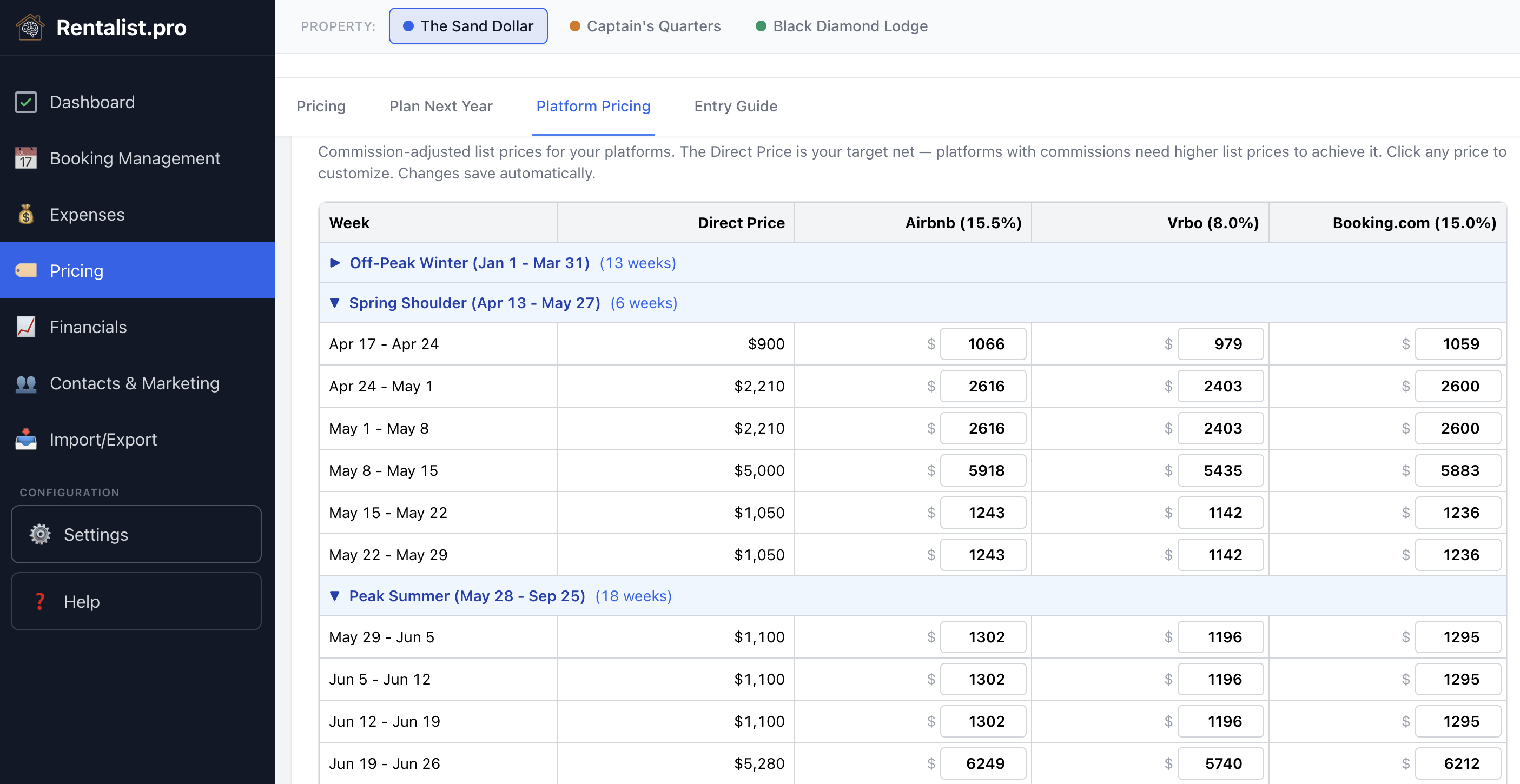
You set one weekly rate in the Calendar — that's what you want to net. Each booking platform takes a different commission. Airbnb's host-only fee is typically 15.5%, Vrbo's pay-per-booking fee is 12% for stays from October 29, 2026 (8% before then), and Booking.com's depends on your agreement with Booking.com, so you enter it yourself. This tab shows you exactly what to list on each platform so that after their commission, you net your target amount.
- Reads from the calendar — Base rates come from whatever you entered on the Pricing tab.
- Commission-adjusted list prices — For each platform with a commission rate, the app calculates the higher price you need to list so you net your Calendar rate after the platform takes its cut.
- Override per week — If you want to list a specific price on a specific platform for a particular week (maybe a promotional rate), you can override the calculated price. Your override is saved and persists.
- Only commissioned platforms — Platforms with no commission (like direct bookings) don't need adjusted prices, so they don't appear here. Your Calendar rate is your direct booking rate.
Once you've set your rates in the Calendar and reviewed the platform-adjusted prices, the Entry Guide helps you enter those rates on each platform. This is a manual process — you'll log into each platform and type in the rates yourself.
Why manual entry?
Channel management software can push rates to platforms automatically, but those services are priced for managers with large numbers of properties. For 1-3 rentals, entering next year's rates is typically about an hour of work per platform — much more cost-effective than a monthly subscription. The Entry Guide and Excel exports are designed to make that hour as painless as possible.
Two views
- Table View — A checklist format with progress checkboxes. Work through each platform week by week, checking off as you go. Your progress is saved if you need to step away and come back.
- Instructions View — Groups consecutive weeks at the same price into ranges (e.g., "Weeks of Jun 7 through Jul 5: $3,200/week") with platform-specific step-by-step directions so you can enter them more efficiently.
Either view can show one flat nightly price across a range instead of a day-by-day breakdown — same weekly total, far less typing.
Weekly-only seasons: When a platform only accepts nightly prices, every night is set to the same amount (your weekly price ÷ 7, rounded down to whole dollars), so the weekly total may land a few dollars under your target — simpler for guests and for you.
Download your rates as formatted Excel spreadsheets to follow along with while entering rates on each platform. The exports are formatted to match each platform's calendar layout, making it easier to visually match what you see on screen. The workbook includes a Direct Prices tab plus calendar-style and instruction tabs for each platform you've enabled — Airbnb, Vrbo, Booking.com, or any custom platform.
One tab lays your direct rates out as a month calendar, so you can check them against a booking site's own calendar at a glance instead of line by line.
Excel files open with formatting intact in Google Sheets and other spreadsheet software. If you manage multiple properties, pricing is per-property — use the property bar at the top to switch between properties.