The Smart Lock Setup for a Vacation Rental (and Why I Skip the WiFi Versions)
The night before the Blizzard of ’26, my plumber Jamie was at our Wellfleet house draining the pipes. I was in New York. He’d let himself in with a temporary code I’d punched into my lock app. The power went out that night for six days in single-digit temperatures. We lost nothing.
We don’t normally winterize the house, but the forecast for that storm was specific enough that I knew bursting pipes in February would mean some nasty repairs in March. That whole sequence — me 250 miles away, Jamie at the door Blizzard Morning — works because of the smart lock.
I’ve owned the place since 2019 and I’ve been through three smart locks. The notes that follow are what I’ve learned by trial and error.
What the smart lock actually does
Two things. The first: you stop mailing keys, hiding keys, and explaining lockboxes and risking a departure without returning that crucial key. Guests get a code that works during their stay and stops working after.
The second matters more in a crisis: you can let a service person in when you’re not there. The plumber, the electrician, the HVAC tech who can’t tell over the phone whether it’s the thermostat or the compressor. (Your cleaner should have their own key or code on file — they’re not someone you should be punching in for on demand.) Building that on-call network deserves its own post and will soon get one. The smart lock is what makes the network actually work when you’re three states away.
My setup, and why
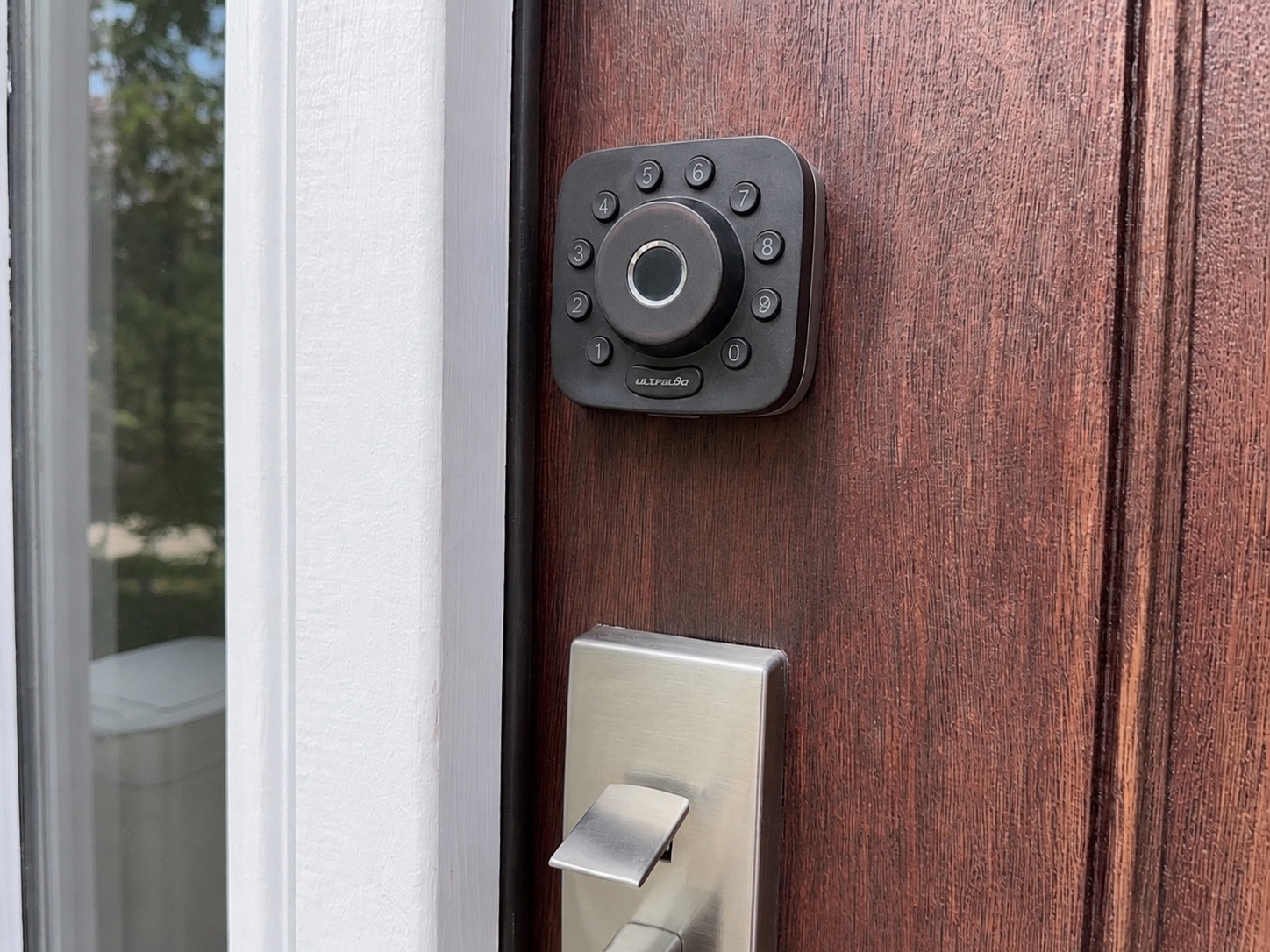
I use the Ultraloq U-Bolt Pro Bluetooth version with a small WiFi bridge plugged into a wall outlet near the door. The lock talks to the bridge over Bluetooth Low Energy; the bridge talks to my router over 2.4GHz WiFi — that’s what makes remote control work. Available on Amazon: about $95 for the lock, $40 for the bridge. Prices move around, so check for sales.
Locks with WiFi built in (the Ultraloq U-Bolt Pro WiFi, the Schlage Encode family, and many others) look cleaner — no separate bridge plugged in. But the WiFi radio inside the lock has to keep listening for instructions, and that radio drinks power.
In theory, a WiFi-direct lock runs 3–6 months on a set of 4-6 AAs, depending on how often it’s used and how far it is from the router. If your front door is two rooms and a basement away from the WiFi access point — common in vacation rentals — battery life can drop to a couple of months. I’ve heard hosts changing batteries every 4-6 weeks. A Bluetooth-plus-bridge setup will go a year on the same set.
The bridge has one quirk: many modern routers run a combined 2.4/5GHz network, and the bridge can’t always join cleanly. You may have to dive into router admin to split the bands or temporarily disable 5GHz. One-time pain, then it stays.
Why battery life matters more than you think
You want the lock working during the stretches when you’re not there — for us, months at a time off-season. A dead lock when nobody’s around is a problem before it’s even a problem. You also don’t want to ask guests to change batteries; they’ll do it, but it dings the experience, and Murphy’s Law says that the one there when the battery needs changing is the least capable of changing batteries.
I get close to a year out of mine. I still change them at the beginning and end of peak season. That wastes some juice, but it means I’m never wondering whether the lock is about to fail the night before someone’s check-in. Cheap insurance.
What to look for, regardless of brand
Three features matter.
Remote code management. You have to be able to add, delete, and schedule codes from anywhere. My first lock — an early Schlage keypad deadbolt — didn’t. To program a code, I had to stand at the door, so I pre-loaded a stack and assigned them to incoming guests. Every pre-stored code is one somebody could theoretically use, and the more codes sitting in the lock at once, the less secure it actually is. Remote management solves it: one code per guest, auto-expired when they leave.
Code length flexibility. A 4-digit code has 10,000 combinations. A 6-digit code has 1,000,000. You’re not protecting state secrets, but a 6-digit code is meaningfully harder to brute force or shoulder-surf. The math is free. Use it.
An app that’s actually usable. Every smart lock company has one. Most are mediocre. The apps are free — download two or three before you buy, and see if you can figure out, in 90 seconds, how to add a guest code that expires next Sunday. If you can’t, you’ll hate that lock. If you need an account before you can see the interior, look for screenshots online.
My recommendations
Ultraloq U-Bolt Pro Bluetooth + WiFi bridge — what I use, around $135 when I last looked. Fingerprint, keypad, app, Bluetooth key, hidden physical key. App is fine, not great. Battery life is excellent. Reviewers rank it for the breadth of unlock options.
Ultraloq U-Bolt Pro WiFi — same lock, WiFi built in, no bridge needed. Cleaner setup. You pay for it in batteries. If your router is right next to your front door and your cleaner can do more frequent battery swaps, this version is fine. Check the battery status on the app weekly and change batteries when it gets anywhere below 50%.
Schlage Encode family — the legacy name. Built like a tank, large code capacity (100 on the Encode, 250 on the newer Arrive), native Airbnb integration that auto-generates codes inside the platform’s app. WiFi-direct, so battery life is 3–6 months. Around $250–300. Good fit for Airbnb-first hosts.
Aqara U200 / U300 — good locks regardless of your smart home setup. Solid hardware, reasonable price (around $180–230), Bluetooth plus Thread/Matter, remote management via an Aqara hub. No booking-platform integration, but the locks themselves are among the better-reviewed at the price.
The thing nobody tells you
A smart lock pays for itself the day something goes wrong and you can let the right person in without driving four hours. That was the Blizzard story, but many other less fraught occasions. Letting the irrigation guy in in late October to turn off the system, that time a guest called about a leaking mini-split. For another owner, it’ll be a dishwasher backing up or a bathroom sink that needs snaking. A $135 setup is operational infrastructure — pick the one that matches your technical chops, your patience with batteries, and your app preferences, and run the 90-second app test before you buy.
What’s your smart lock setup — and what other smart home gear (thermostats, leak sensors, cameras, anything) has actually earned its keep in your rental? Comments are open.